
One place for your entire research workflow.
Right now, writing a paper means bouncing between your PDF reader, notes app, citation manager, and Word. That context-switching is where your time goes. CrucibleIQ is an Integrated Research Environment (IRE): one place to research, read, annotate, write, cite, and publish.
AI Research Assistant
Keyword roulette, retired.
Describe the research. The AI does the keyword work.
What it does
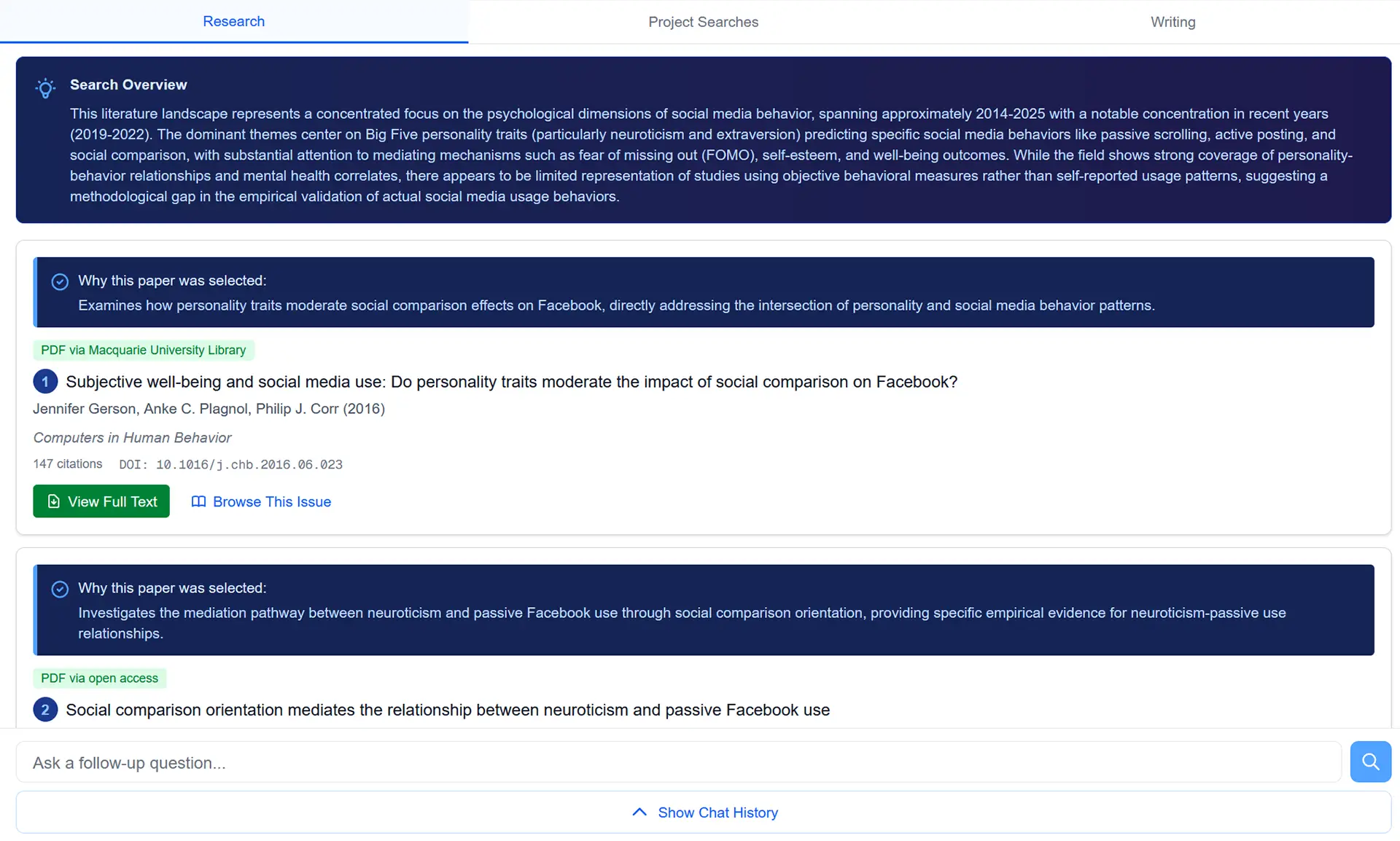
Academic search has been the same broken game for decades: pick keywords, hope the database parses them the way you mean, scroll through hits, repeat in the next database when the first one disappoints. Our AI Research Assistant breaks that loop. Describe the research, in normal sentences, with the context and the angle you care about. CrucibleIQ works across 480M papers, returns the ones that fit, and gives you the reasoning per result so you can tell at a glance which ones are worth opening.
How it works
CrucibleIQ reads your description as a research intent, not a keyword query. It searches semantically across the corpus, ranks by topical relevance, and writes a brief Search Overview synthesizing what the literature shows on your question. Per-result rationale comes from the papers themselves, not generic relevance scores.
Describe the research. The AI does the keyword work.
AI-Powered Metadata Extraction
Drop a PDF in. The data fills itself.
Upload the PDF. Walk away. Come back to a fully cited source.
What it does
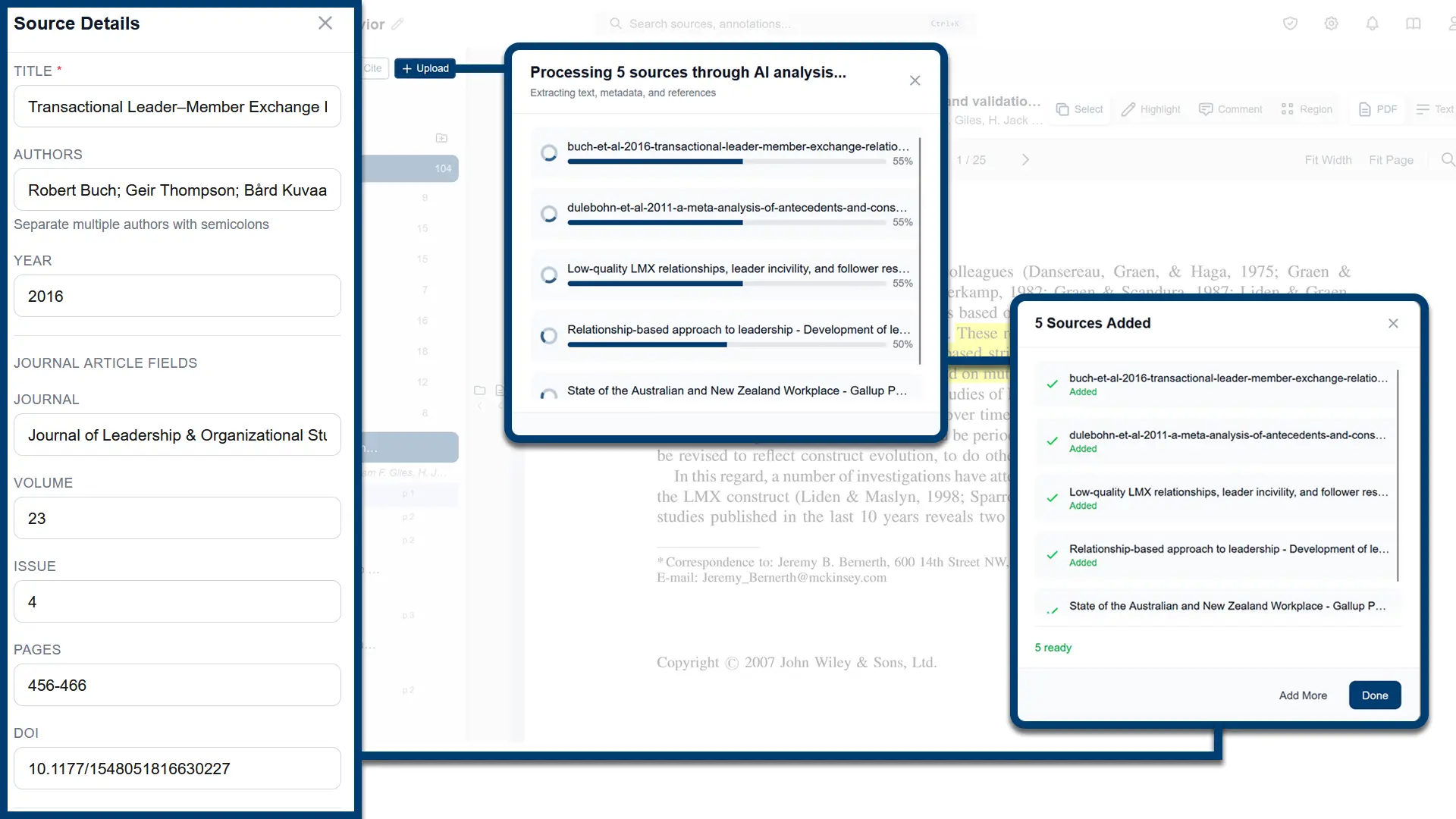
Citation managers make you do some version of the same loop: find the DOI, paste it in, hope the metadata comes back complete, type the rest in by hand when it doesn't. CrucibleIQ skips the loop. Drop the PDF in. By the time the progress bar fills, every metadata field is populated and the source is ready to search and cite without you ever typing into the form.
How it works
CrucibleIQ analyzes each PDF through multiple extraction methods, working through them until every field is filled. The result is metadata that's ready to cite by the time the upload finishes.
Upload the PDF. Walk away. Come back to a fully cited source.
PDF Reader with Annotation Workflow
Annotations that escape the PDF.
Your annotations are working data, not just marks on a page.
What it does
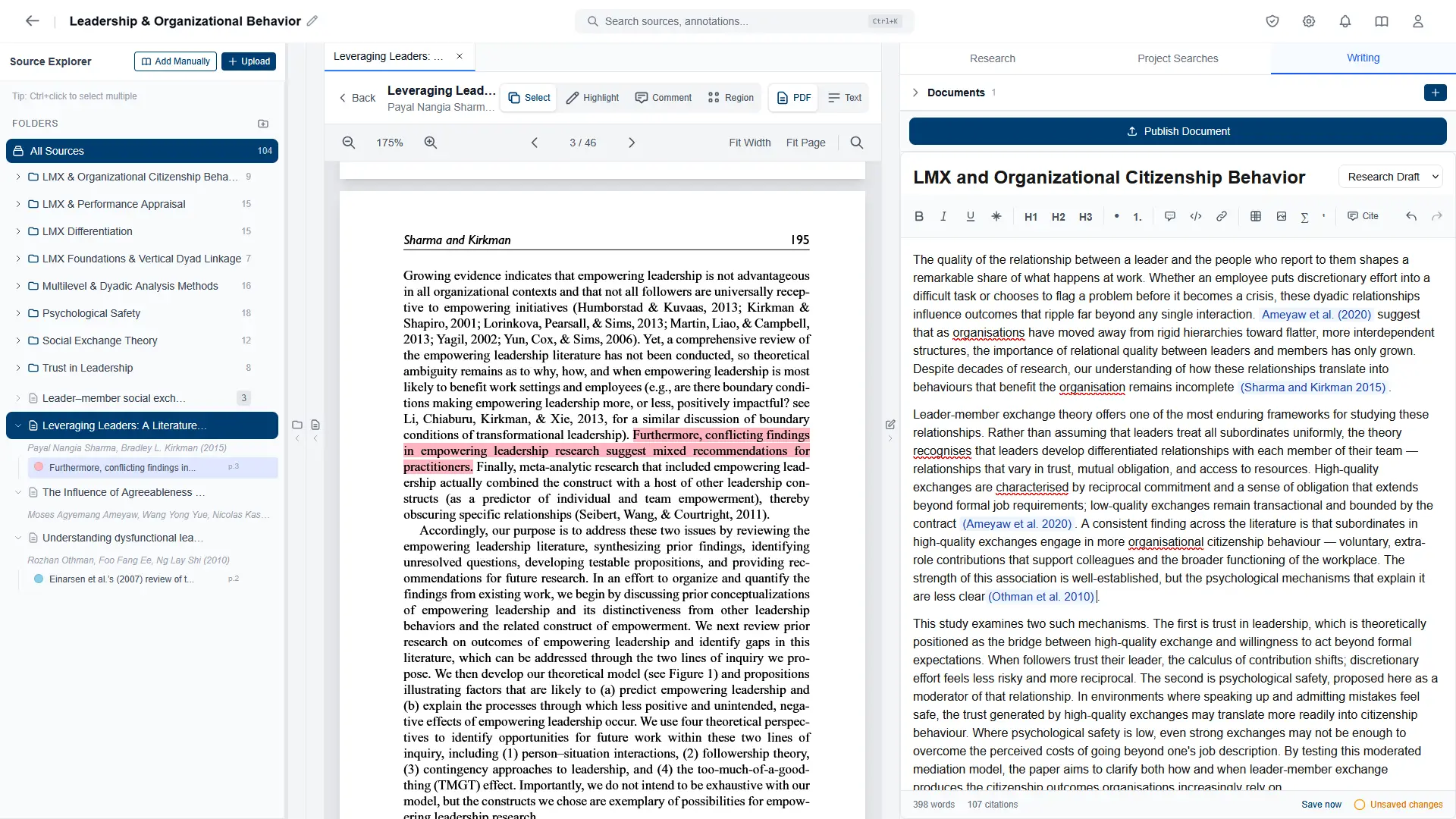
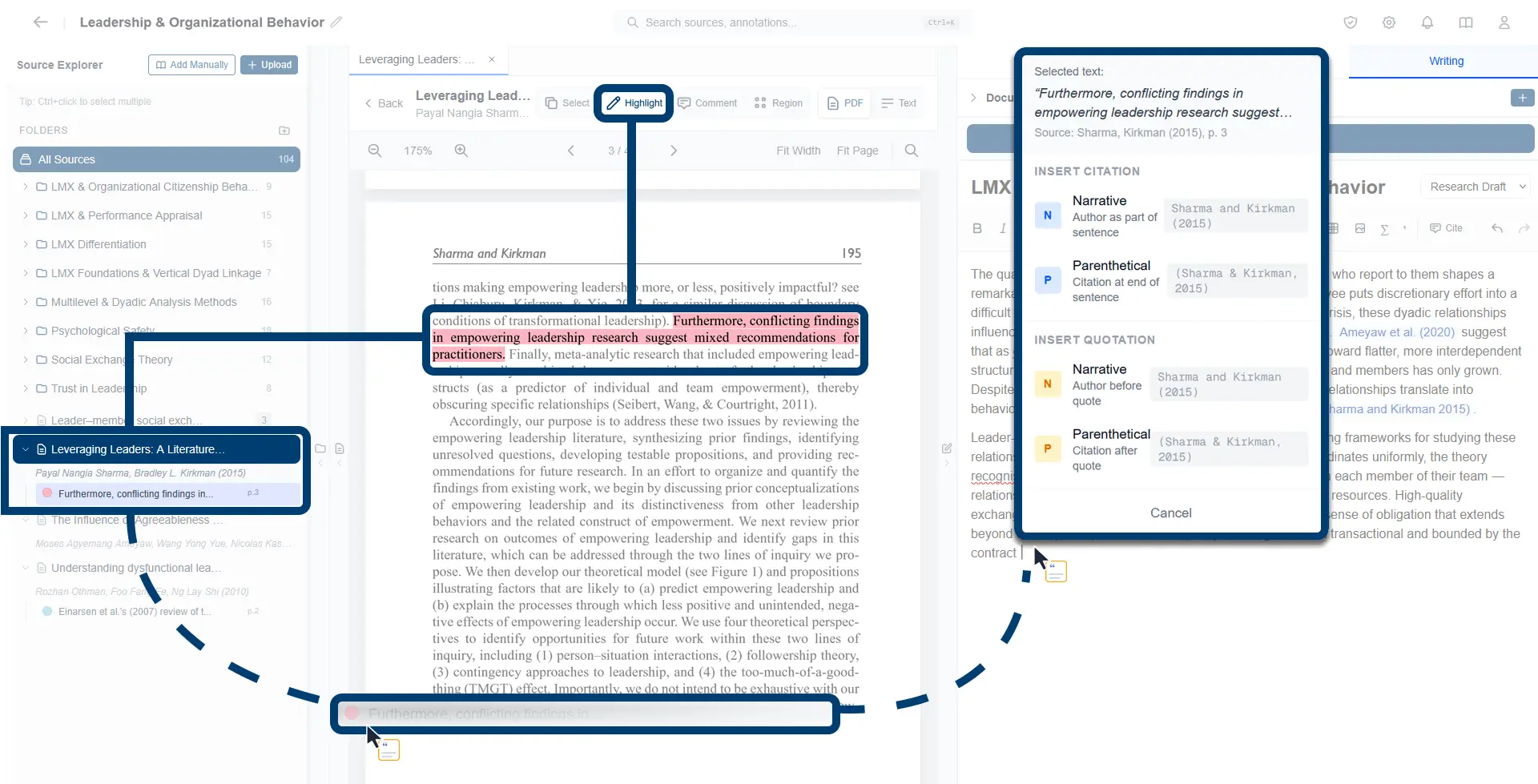
Most readers store annotations as marks on a page, visible inside the PDF and useless outside it. In CrucibleIQ, every highlight and comment becomes a piece of project data. The annotation shows up in the Source Explorer with its source. Click it to jump back to the page. Drag it into your draft and it converts into a formatted citation, pulled from the source it came from.
How it works
CrucibleIQ stores every annotation with its source rather than burying it inside the PDF file. From there, the annotation is searchable across the whole project, jumps back to its page when clicked, and can be dragged into the Writer where it becomes an in-text citation.
Your annotations are working data, not just marks on a page.
AI Search Across Your Sources
Ask a question. Find the relevant passages.
Search all your sources at once. Read only what matters.
What it does
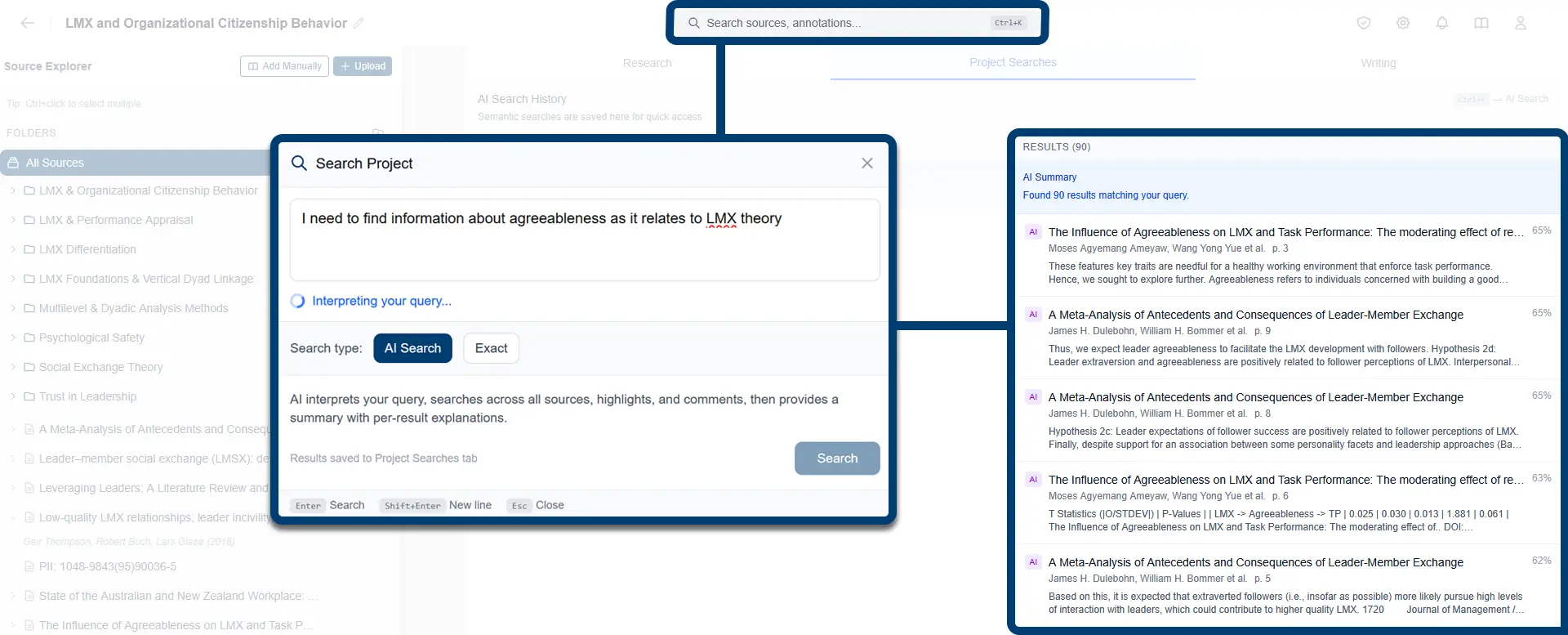
Once you've built up a working collection of sources, the next problem is finding what's actually in them. Describe what you're trying to find, in normal sentences, and CrucibleIQ pulls the relevant passages out of every source and every annotation in your project. You stop reading hundreds of papers from scratch and start reading only the parts that matter.
How it works
AI Search interprets the meaning of your question and searches the full text of your sources and annotations, ranking the relevant passages by topical fit. Each result is shown with its excerpt, source, and page. When you want a literal match on exact wording, switch to exact-string mode.
Search all your sources at once. Read only what matters.
Citations That Build Themselves
Ditch the tedium. Focus on your argument.
Drag-and-drop your citations and be done in seconds.
What it does
Inserting citations and formatting reference lists has traditionally been a manual task. Surnames you can barely spell, author lists that read like short stories, inserting commas, periods, brackets and jumping in and out of italics. Every citation is a tedious, slow and cognitively draining task that does nothing for your paper's argument. CrucibleIQ has none of it. The metadata for every source you've added flows throughout the workflow. Drag an annotation into your research draft and the citation formats itself, in your chosen type and style, while your reference list builds itself, too.
How it works
When you drag an annotation into the Writer, the Citation menu lets you choose narrative or parenthetical, and inserts a properly formatted in-text citation using the available metadata. The Quotation option also carries the selected text into the draft. If the source has metadata issues, CrucibleIQ flags these red to give you the opportunity to fix them.
Drag-and-drop your citations and be done in seconds.
Citation Validation
Your citations, defensible under any review.
Catch the credibility hits before anyone else does.
What it does
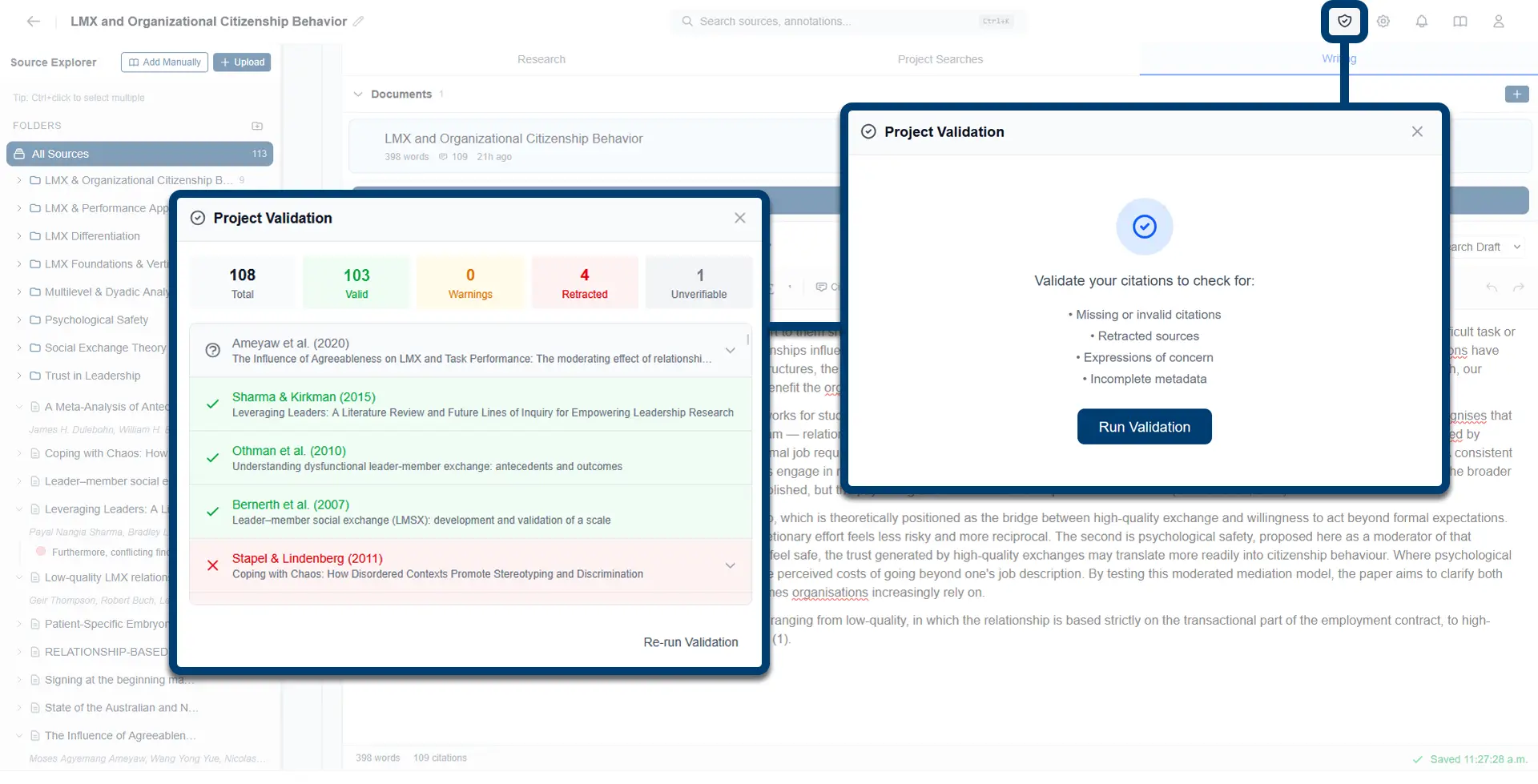
Whether the audience is a reviewer, a committee, an auditor, or your future self, a citation that turns out to be retracted or pointing at the wrong source is a credibility hit. CrucibleIQ catches retractions, expressions of concern, metadata and in-text citation issues before your work reaches its audience, and tells you which sources need attention before you finalize.
How it works
Run validation and CrucibleIQ checks every citation in your project for validity. Results display in a panel: total citations, valid, warning, retracted, and unverifiable. Drilling into any flagged citation shows the specific issue, so you can fix it before you finalize your draft.
Catch the credibility hits before anyone else does.
Writer with Synced Reference List
Skip the bliss-shattered moment. Be done when the writing is.
Publish is the finish line.
What it does
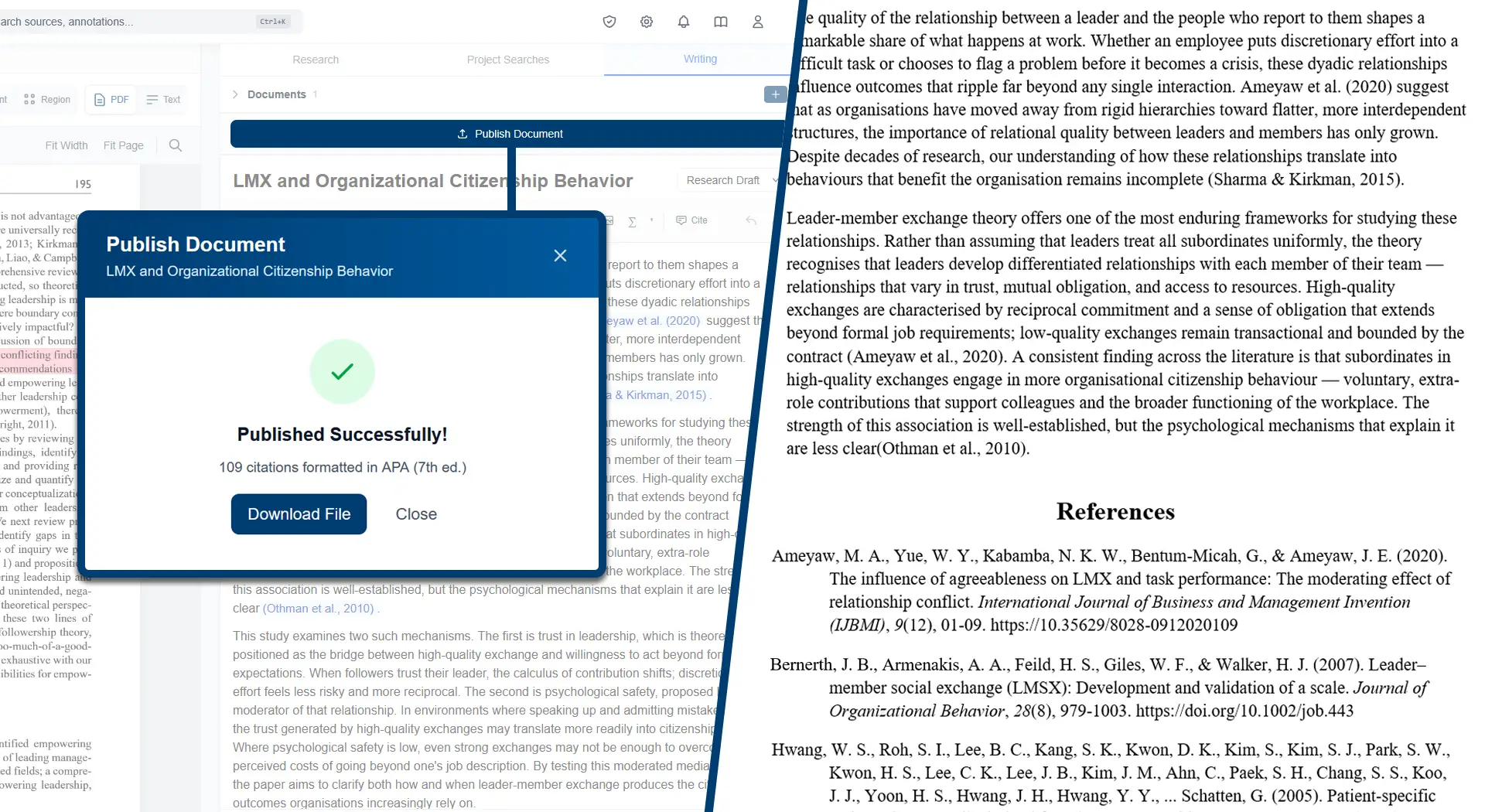
You breathe a sigh of relief as you write the last sentence of your paper, but that moment of bliss is shattered the second you remember your reference list isn't complete. Three hours later, you're still working through it; which unnamed PDF was the Smith (2024) paper? Have I cited every source I've used? Is every in-text citation linked to a record in the reference list? Is the punctuation and formatting correct? CrucibleIQ doesn't put you through this. You hit publish and download the finished draft. Every in-text citation accounted for and the reference list compiled and formatted.
How it works
When you publish, the reference list is generated directly from the in-text citations in your draft. Anything cited shows up. Anything uncited stays out. The Word output formats each entry in the project's active style and confirms the citation count when it's ready to download.
Publish is the finish line.
All features. Every plan.
No tiers, no feature gating. Pick a duration that fits your term and get everything.
All features included. Cancel anytime.